
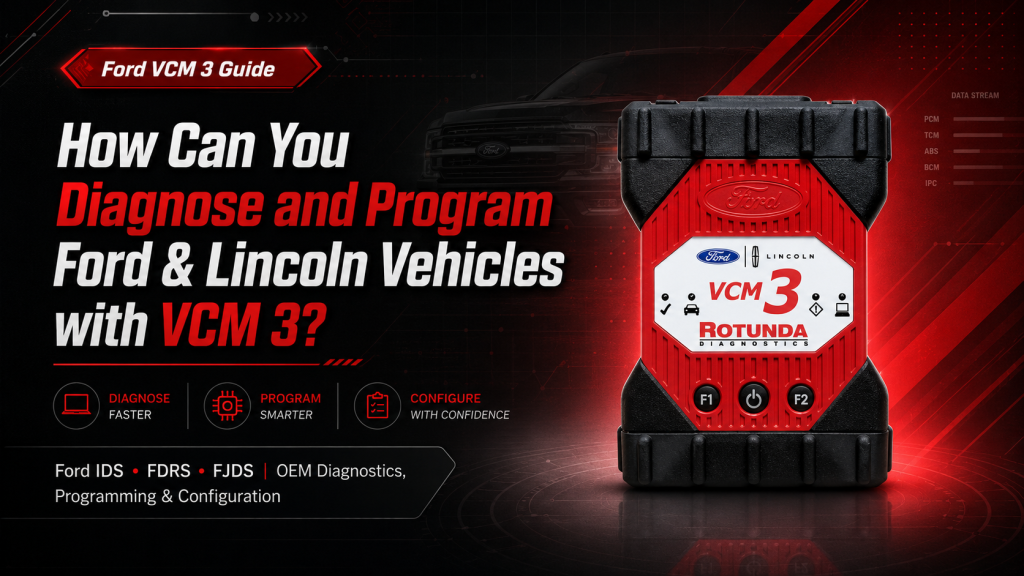
How to Diagnose and Program Ford & Lincoln Vehicles with Ford VCM 3
How Can You Diagnose and Program Ford & Lincoln Vehicles with VCM 3?
Learn how professional workshops use Ford VCM 3 with IDS, FDRS and FJDS for supported Ford and Lincoln diagnostics, module programming, configuration and service procedures.

Can the Ford VCM 3 diagnose and program every Ford or Lincoln vehicle?
VCM 3 can provide OEM-level communication on supported vehicles, but the hardware does not work alone. The workshop also needs the correct Ford software, licence or subscription, account permissions, suitable programming power supply and internet access for online procedures. Always confirm coverage by VIN, model year, market, module and required function.
What do you need before the VCM 3 can diagnose or program a vehicle?
A Ford dealer-level setup has three separate parts. Understanding them prevents confusion between the hardware, software and licence.
VCM 3 Hardware
The physical communication interface connects the supported Ford or Lincoln vehicle to a Windows diagnostic computer through USB or configured wireless communication.
Ford Diagnostic Software
IDS, FDRS or FJDS provides the diagnostic menus, guided tests, module functions, programming procedures and vehicle-specific service operations.
Licence & Online Access
Programming, calibration downloads and security-related procedures may require an active subscription, an approved Ford account and regional authorization.
Which Ford software works with the VCM 3?
The correct platform depends on the vehicle architecture, production year, market and the exact function required.
Integrated Diagnostic Software
Commonly used for many earlier supported Ford and Lincoln platforms. Functions may include full diagnostics, guided tests, module installation, reprogramming and service procedures.
Ford Diagnostic & Repair System
Used for newer Ford vehicle architectures and modern service applications, including advanced diagnostics, network functions and programming on compatible vehicles.
Ford J2534 Diagnostic Software
Provides diagnostic and module-programming access for supported vehicles and procedures. Coverage should be confirmed before starting the job.
Why should the VIN be checked first?
Two vehicles with the same model name can use different electronic platforms and software workflows. Ranger, Transit, Everest and Lincoln models can also vary by market. Confirm the VIN, year, region and required procedure before giving the customer a final quotation.
What can a professional workshop do with Ford VCM 3?
The exact functions are displayed by the Ford software according to the connected vehicle and supported control modules.
Full-System Diagnostics
Read supported module fault codes, run KOEO and KOER tests and access body, chassis, electrical and powertrain systems.
Live Data & Logging
Monitor relevant sensor values, compare parameters and record data while diagnosing intermittent or performance-related faults.
Active Tests
Command supported relays, valves, fans, motors, solenoids and other outputs to verify component and circuit operation.
Vehicle Network Testing
Identify communicating and offline control modules when investigating CAN network, wiring or power-supply problems.
Module Installation
Perform Programmable Module Installation on supported replacement modules using the correct Ford procedure and access.
Module Reprogramming
Install supported Ford software or calibration updates when a repair procedure or replacement module requires programming.
Configuration & Parameters
Access supported programmable parameters and vehicle configuration settings after confirming the correct workflow.
ABS & Chassis Functions
Run supported ABS bleeding, initialization, ride-height calibration and other model-specific chassis procedures.
Engine & Transmission Tests
Access supported EVAP, fuel, injector flow, power balance, relative compression, EGR and transmission testing.
How should technicians diagnose or program a Ford vehicle with VCM 3?
Proper preparation protects the control module, reduces failed programming and prevents unnecessary workshop delays.
Confirm the Vehicle
Record the VIN, model, year, engine, market and the module or system requiring work.
Select the Software
Check whether IDS, FDRS or FJDS supports the vehicle platform and requested procedure.
Prepare the System
Update Ford software, VCI Manager and VCM 3 firmware before beginning the procedure.
Stabilize Voltage
Connect a suitable regulated programming power supply and use a reliable laptop and connection.
Follow Ford Prompts
Do not disconnect power, the diagnostic cable or the computer until the procedure is fully completed.
How is VCM 3 different from a regular scanner or Ford VCMM?
| Capability | Regular Scanner | VCM 3 + Ford Software | Ford VCMM |
|---|---|---|---|
| Read and clear DTCs | Usually available | Yes, on supported systems | Yes |
| Ford guided tests | Varies by scanner | Available where supported | Available |
| Programmable Module Installation | Limited or unavailable | Supported with correct access | Supported |
| Module reprogramming | Varies | Supported with correct access | Supported |
| CAN-FD communication | Depends on hardware | Yes, for supported applications | Yes |
| Oscilloscope and DMM | Only on selected tools | Not built in | Included |
| Vibration analysis | Normally unavailable | Not included | Included |
Which tool is suitable for your workshop?
Choose VCM 3 when the main requirement is Ford and Lincoln OEM communication, diagnosis, programming and configuration. Choose VCMM when the workshop also needs oscilloscope, multimeter and vibration-analysis capability.
What should be checked before programming a Ford control module?
Programming is more sensitive than reading a fault code. A voltage drop, internet interruption or communication failure can stop the procedure and may leave the control module unable to operate.
Security-related procedures require authorization
PATS, key and other security procedures depend on the vehicle, market, Ford requirements, approved technician credentials and authorized account access. Confirm eligibility before accepting the job.
Should your workshop buy VCM 3 hardware only or a complete package?
VCM 3 Interface Package
Suitable for workshops that already understand Ford software installation, subscription, account requirements and programming support.
View Hardware OnlyVCM 3 with Ford Software
Better for workshops that need confirmed software access, licence duration, setup guidance and technical support together with the interface.
View Complete PackageWhat do technicians ask most often about Ford VCM 3?
What exactly is the Ford VCM 3?
It is Ford’s professional Vehicle Communication Module. It connects supported Ford and Lincoln vehicles to a Windows diagnostic computer so Ford software can communicate with vehicle systems. It is hardware, not diagnostic software by itself.
Which Ford software works with VCM 3?
VCM 3 works with Ford IDS, FDRS and FJDS. The correct platform depends on the vehicle, model year, architecture, market and the exact procedure required.
Can VCM 3 program an ECU, TCM, BCM or ABS module?
It can support module installation, reprogramming and programmable parameters on compatible vehicles and modules. Availability depends on the VIN, module, Ford software, subscription and online access.
Does VCM 3 support newer CAN-FD Ford vehicles?
Yes, for supported CAN-FD applications. Exact coverage can vary by model year, vehicle platform, market and required function.
Can VCM 3 diagnose Ford medium-duty trucks?
It supports compatible J1708 and J1939 applications. A suitable Rotunda medium-duty DLC adapter and the correct manufacturer-specific software may also be required.
Can VCM 3 connect wirelessly?
Yes. Wireless communication is supported, while USB is commonly required for initial setup, computer pairing, configuration and firmware updates.
Does VCM 3 include an oscilloscope or multimeter?
No. VCM 3 is primarily a communication, diagnostic and programming interface. Ford VCMM adds advanced measurement and vibration-analysis functions.
Does every VCM 3 package include software and licence?
No. Some packages include only the interface, while others include software access for a stated period. Confirm the software, licence duration, laptop, installation, support and warranty before purchasing.
Who should purchase Ford VCM 3?
It is suitable for Ford and Lincoln specialists, diagnostic workshops, programming technicians, fleet maintenance departments and supported medium-duty truck workshops that need OEM-level access.
Not sure which Ford VCM 3 package your workshop needs?
Send Automax Tools the vehicle model, year, VIN or market, the module involved and the exact function required. Our sales and technical-support team can help confirm the suitable hardware, software and licence before purchase.
Coverage and programming availability vary by model, year, VIN, region, module, software, subscription and security authorization. Always follow official Ford service and programming procedures.


No Comments